20120624

Raspberry Pi - alsa

Install alsa:

  • sudo apt-get alsa

and make sure that the module is loaded:

  •  sudo modprobe snd-bcm2835

20120623

Raspberry Pi - ssh


Using the Debian squeeze image from http://www.raspberrypi.org/downloads

I'd like to be able to run it headless, need ssh running automatically after boot:
  1. ssh-keygen (answer the prompts)
  2. sudo update-rc.d ssh default
  3. sudo reboot
or

  1. cd /boot
  2. sudo mv boot_enable_ssh.rc boot.rx
  3. sudo reboot


20120617

Robot hand from seven parts - 2 (some photos)


The finger bend both ways: the finger tips can therefore are either pads or sharp.

From the base of the wrist to the tip of a finger is about 27cm. If i ever get to build the entire robot it'll be approx 2m70 high...

Robot hand from seven parts - 1

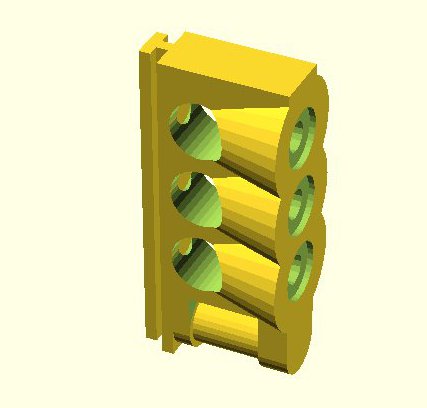
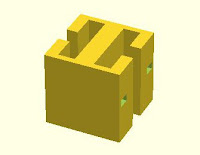
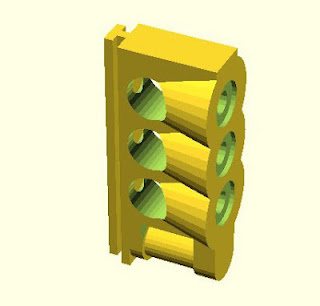
Take one or more of each of the following parts, snap or friction fit them together and you get a robot hand!

Snap the first two together to create a rotating joint:


Hold a couple of those together with a connection piece and you get finger:
At one end of the finger place a finger tip:
Give the thumb an additional degree of rotation:

 Use a spacer between the fingers...
when you slide them on the wrist, then snap the thumb on and the hand is ready.

Partslists:

Part 1 Part 2Part 3Part 4
Part 5Part 6Part 7


Finger:
  • Part 1 : 3
  • Part 2 : 3
  • Part 3 : 3
  • Part 4 : 1

Thumb:

  • Part 1 : 4
  • Part 2 : 4
  • Part 3 : 4
  • Part 4 : 1
  • Part 5 :1

Hand:

  • Part 1 : 16
  • Part 2 : 16
  • Part 3 : 16
  • Part 4 : 5
  • Part 5 : 3
  • Part 6 : 4
  • Part 7 : 1


20120516

Installing SImpleOpenNI for an Asus Xtion


  • follow the instructions from simple-openni/wiki/Installation
  • OpenNI installs very quickly, on to Nite
  • which fails with a " niReg: error while loading shared libraries: libOpenNI.so: cannot open shared object file: No such file or directory."" error 
  • but the file is there! Google for it: reboot or run "ldconfig -v", "ldconfig -v" it is
  • now Nite installs
  • install the Sensor
  • and 'install' SimpleOpenNI = copy the files across - easy!
  • and then we go and find some sample code to run!

20120421

Upgrading the firmware on my Ultimaker

I've never looked much at upgrading the firmware on my Ultimaker and the few times i did try it never worked... Up to now that's never been an issue ... but i just ordered an Ultimaker Controller. And that requires Marlin: "For older firmwares you should upload new firmware". So it's time to get the firmware updated!

Let's try one more time:


And it still fails...

When it fails it tells you to look at the console, so better do that: it complains about not being able to access my usb port /dev/ttyACM0, as there is a problem with the lock file. Ok, that's easy: delete the lock file (maybe it's left behind for some reason...).

Nope, doesn't like that either, but there is progress! Instead of complaining about the lock file it's now getting timeouts.

Time for another look in the console, it shows the command it's trying to run. Hmm, let's kill replicatorg and run the command:  avrdude -Cavrdude.conf -cstk500v2 -P/dev/ttyACM0 -b115200 -D ... (all paths are stripped from this example, i just copied and pasted the command from the console without any editing).

And that works!

20120313

Roomba & Rootooth

Just got a Rootooth for my Roomba and initially it didn't work! (so yes indeed, that means that eventually i got it working)


Step one: is my bluetooth dongle working?
# hciconfig hci0

hci0: Type: BR/EDR Bus: USB BD Address: 01:23:45:67:89:01 ACL MTU: 1021:8 SCO MTU: 64:1
RX bytes:290 acl:0 sco:0 events:6 errors:0
TX bytes:21 acl:0 sco:0 commands:7 errors:0
UP RUNNING

Yes!


Step two: can i see the roomba?
# hcitool scan
Scanning ...
Inquiry failed: Connection timed out
No...

Ok, maybe reset the bluetooth adapter?
# hciconfig hci0 reset
# hcitool scan                              
Scanning ...                                                                  
        00:11:22:33:44:55       FireFly-176B   

That's more like it.

Step three: connect it using rfcomm

#rfcomm connect 5 00:11:22:33:44:55
Connected /dev/rfcomm5 to 00:11:22:33:44:55 on channel 1
Press CTRL-C for hangup
Ok, so now i can send commands to it using serial in python as it says in the SCI Specs! And yes i can send whatever i want. Unfortunately the Roomba isn't impressed. At all.


At least until i stumbled across python-library-for-roomba-sci.html and now it works fine. Seems to be related to the fact that it likes money (send it dollars and you're in business: self.port.write("$$$")).